Verification of Payee (EU)
Use the Verify Beneficiary Account API and Create Beneficiary API together to reduce misdirected EUR SEPA payments
Introduction
Learn how to verify beneficiary bank account details before creating a beneficiary to improve customer experience and reduce misdirected payments.
This guide is designed to help you verify beneficiary bank account details for outbound EUR SEPA payments, via the Verify Beneficiary Account API on our Verification of Payee Outbound service. Verifying beneficiaries helps avoid payments being sent to the wrong account and adds another layer of protection in the fight against fraud and scams.
For clients under the Sponsored or Treasury service model and contracted with Currencycloud BV, it is a mandatory requirement to integrate with this API if you offer EUR SEPA payments to your customers.
What is it?
The Verify Beneficiary Account API endpoint can be used to verify a beneficiary's bank account details, and in the SEPA Euro market verify the name of the individual or company provided.
How does it work?
1 The end-customer inputs the beneficiary’s account details.
2 Currencycloud forwards this request to the beneficiary’s bank, or cross-references it against a dataset.
3 For the EU market, we will return a response displaying the result of the verification that may include answer, actual_name, reason_code, reason, reason_type.
Who is an end-customer, and where does the verification need to take place?
In most cases, an end-customer will be an individual or business that we contract with and provide regulated payment services to. The requirement is that the end-customer must be able to receive a verification response before they proceed to create the beneficiary on your interface. For example, if you are an accounts payable platform, the end-customer using the platform must be able to verify the beneficiary details before creating the beneficiary and submitting the invoice payment.
However, in some use cases the end-customer cannot create a beneficiary, but you are still technically in scope to provide this service. An example of this might be a Wealthtech that automatically populates the same account details used to pay-in. If this applies to you, please consult your Account Manager and Solutions Consultant who will work with you to understand your use case.
Availability
We already offer the Verify Beneficiary Account API in the UK, and are now expanding to the SEPA EUR regions in Beta. We will support more countries in the future. Please contact customer support or your Account Manager to find out more.
Step 1: Login
Please refer to the Authentication guide for instructions for starting a new API session. Make sure your Contact ID is enabled to access this product in our Demo environment.
Step 2: Verify Beneficiary
You will be required to verify your beneficiaries in the following scenarios:
a. Before you create a new beneficiary
b. Before you update details of an existing beneficiary
c. Before you send a payment to an existing beneficiary
d. Before you send a payment to a new beneficiary
To verify a beneficiary’s bank account details in the SEPA EUR regions, make a POST request to the Verify Beneficiary Account endpoint.
Requests
The request body includes the following parameters:
Content-Type: multipart/form-data
| payment_type | Form Data | Yes | regular | Regular for Local payments. |
| bank_country | Form Data | Yes | NL | Two-letter code for the country in which the beneficiary's bank account is held. |
| currency | Form Data | Yes | EUR | Three-letter currency code. Currency in which money will be sent to the beneficiary's bank account. |
| beneficiary_entity_type | Form Data | Yes | individual | "individual" or "company". If individual then 'beneficiary_first_name' and 'beneficiary_last_name' are mandatory. If company then 'beneficiary_company_name' is mandatory. |
| beneficiary_company_name | Form Data | --- | --- | Must include this if the entity is a Company. |
| beneficiary_first_name | Form Data | --- | Ricardo | Must include this if the entity is an Individual. |
| beneficiary_last_name | Form Data | --- | Sousa | Must include this if the entity is an Individual. |
| iban | Form Data | Yes | [Sensitive data redacted] | Must include this in the request |
Example Request:
{
  "payment_type": "regular",
  "bank_country": "NL",
  "currency": "EUR",
  "beneficiary_entity_type": "individual",
  "beneficiary_company_name": null,
  "beneficiary_first_name": "Ricardo",
  "beneficiary_last_name": "Sousa",
  "iban": [Sensitive data redacted]
}
Responses
Example Responses
200
{
	"answer": "full_match",
	"actual_name": "Ricardo Sousa",
	"reason_code": "AV100",
	"reason": "Beneficiary details confirmed.",
	"reason_type": "okay"
}
The following parameters are included in the response body.
You must disable the ability of your interface to cache data so that no end-customer is able to access data previously obtained under a VoP Request without undertaking a further VoP Request.
| answer | FormData | enum | full_match | Indicates whether the verification resulted in a match. Possible values are full_match, close_match, or no_match. |
| actual_name | Form Data | string | Ricardo Sousa | The actual name of the account holder. Present if reason_code is AV100 or AV300 |
| reason_code | FormData | enum | AV100 | Encoded reasons. Present if answer is full_match , close_match or no_match. See reason code tab for full list and handling requirements. |
| reason | FormData | string | Beneficiary details confirmed | Metadata for reason_code. Only populated if reason_code is present. Values correspond to code descriptions for the reason_code. |
| reason_type | FormData | enum | okay | Metadata for reason. Only populated if reason_code is present. Type corresponds to suggested warning message requirements in client UI. Possible values are okay, rejected and warning. |
Guidance on reflecting API responses in the UI
When integrating with our Verify Beneficiary Account API it is important to handle the various responses effectively in order to provide a seamless user experience. Below are suggestions for implementing each response in your interface, with copy and UX handling suggestions.
If you’re a Sponsored or Treasury model client that contracts with Currencycloud BV using the API then you must include this step as part of your EUR beneficiary creation flow before paying out to a beneficiary via our create payment API.
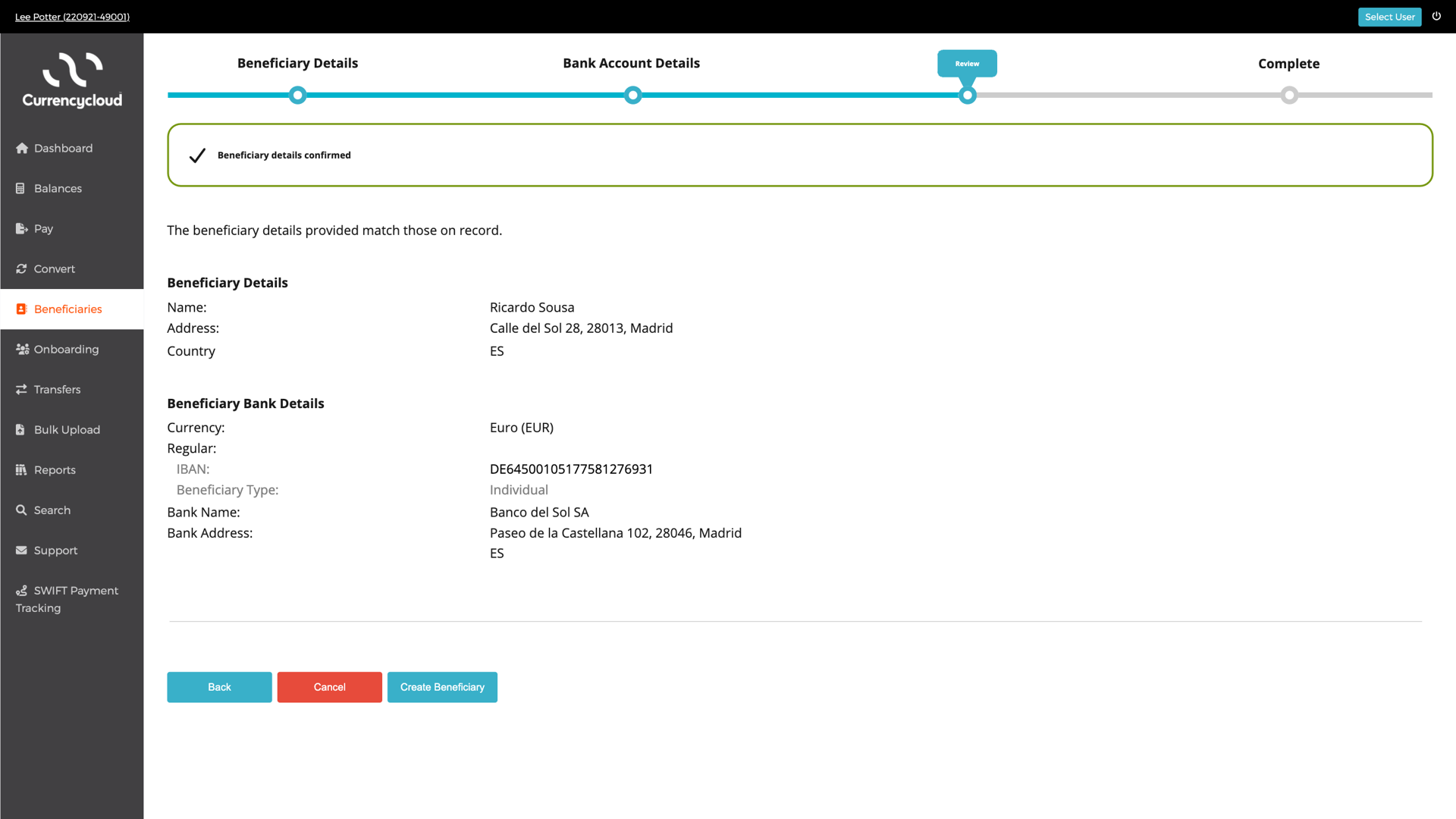
1. AV100 (Full match)
Request:
{
	"payment_type": "regular",
	"bank_country": "NL",
	"currency": "EUR",
	"beneficiary_entity_type": "individual",
	"beneficiary_company_name": null,
	"beneficiary_first_name": "Ricardo",
	 "beneficiary_last_name": "Sousa",
	 "iban": "[Sensitive data redacted]"
}
Response:
200
{
	"answer": "full_match",
	"actual_name": "Ricardo Sousa",
	"reason_code": "AV100",
	 "reason": "Beneficiary details confirmed.",
	 "reason_type": "okay"
}
API Reason: Beneficiary details confirmed.
Description: The beneficiary details provided match those on record.
Handling: The end-customer can proceed with creating the beneficiary.
UI Suggestion:
2. AV300 (Close match)
Request:
{
  "payment_type": "regular",
  "bank_country": "NL",
  "currency": "EUR",
  "beneficiary_entity_type": "individual",
  "beneficiary_company_name": null,
  "beneficiary_first_name": "Ricardo",
  "beneficiary_last_name": "Sous",
  "iban": "[Sensitive data redacted]"
}
Response:
200
{
    "answer": "close_match",
    "actual_name": "Ricardo Sousa",
    "reason_code": "AV300",
    "reason": "The beneficiary details provided closely match those on record, however the beneficiary name is Ricardo Sousa. By authorising this payment, you may be transferring funds to a payment account that does not belong to the intended recipient. Please double-check the beneficiary details before proceeding.",
    "reason_type": "warning"

}
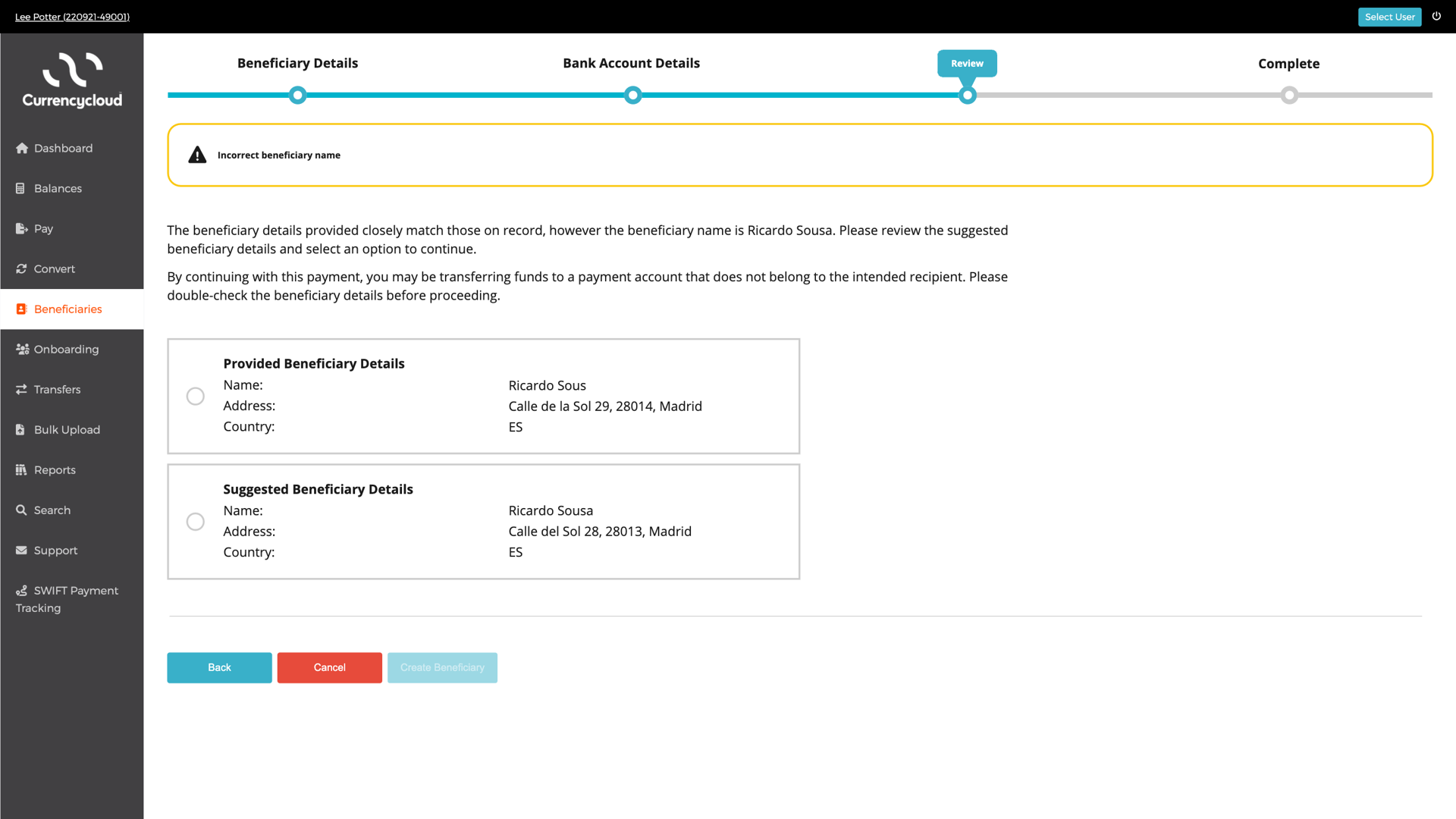
API Response: AV300
Description: The beneficiary details provided closely match those on record, however the beneficiary name is [actual_name]. By authorising this payment, you may be transferring funds to a payment account that does not belong to the intended recipient. Please double-check the beneficiary details before proceeding.
Handling: In the event of a close match, display the actual_name to the end-customer. Consider providing a call to action or button to nudge the user into submitting the correct details. This reduces cognitive load and makes it easier for them to adjust their choice.
In the event of a close match, it’s important that you explain the problem and solution clearly. However, if the end-customer decides to proceed, present a dialogue box with a secondary warning indicating that they do so at their own discretion and risk.
UI Suggestion:
3. AV201 (No match)
Request:
{
  "payment_type": "regular",
  "bank_country": "NL",
  "currency": "EUR",
  "beneficiary_entity_type": "individual",
  "beneficiary_company_name": null,
  "beneficiary_first_name": "Ricardo",
  "beneficiary_last_name": "Smith",
  "iban": "[Sensitive data redacted]"
}
Response:
200
{
  "answer": "no_match",
  "actual_name": null,
  "reason_code": "AV201",
  "reason": "Beneficiary details provided do not match those on record. By authorising this payment, you may be transferring funds to a payment account that does not belong to the intended recipient. Please double-check the beneficiary details before proceeding.",
  "reason_type": "rejected"
}
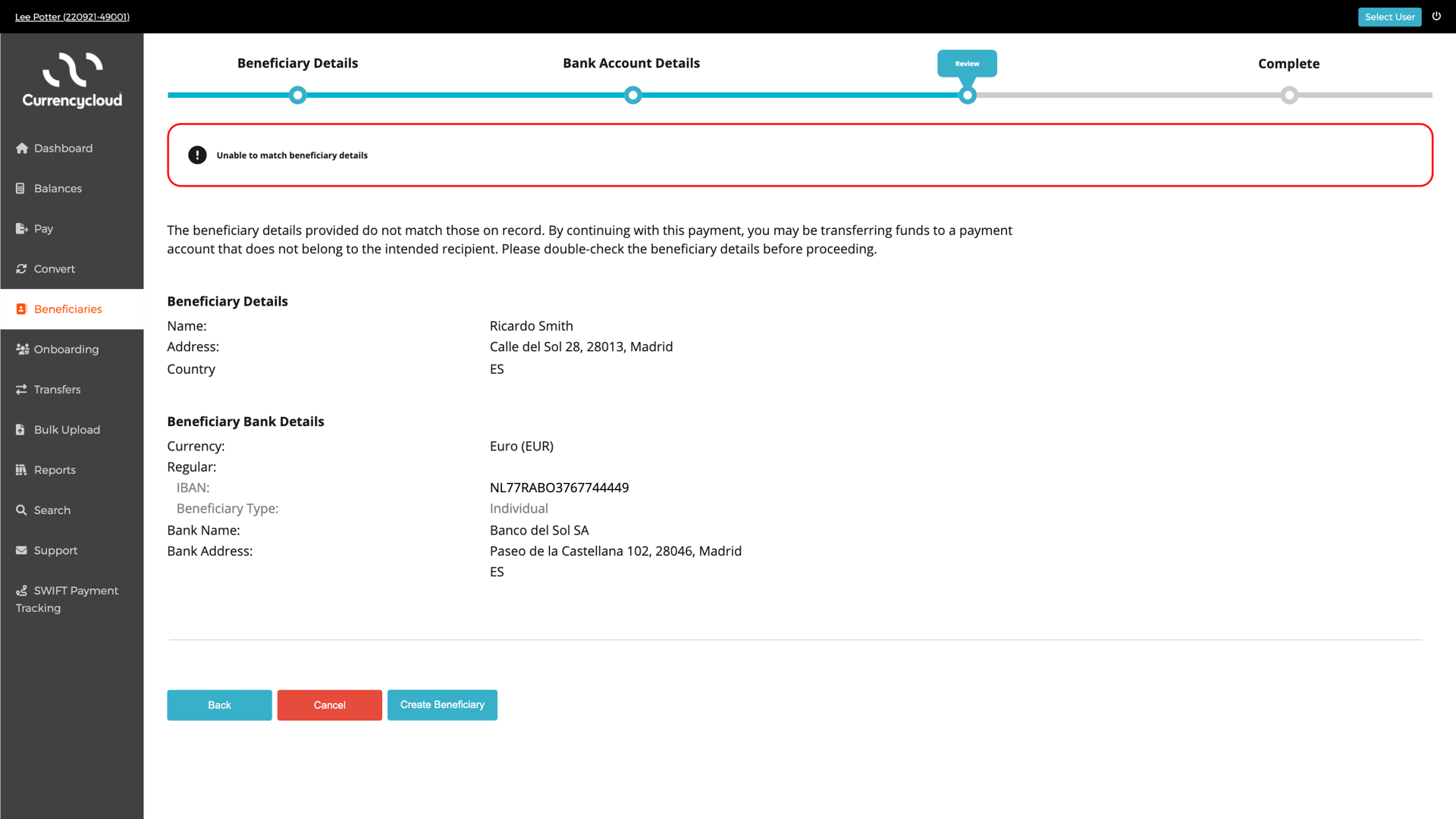
API Response: AV201
Response: Beneficiary details provided do not match those on record. By authorising this payment, you may be transferring funds to a payment account that does not belong to the intended recipient. Please double-check the beneficiary details before proceeding.
Handling: There is a no match. Display a negative notice highlighting the error. The actual_name will not be provided in the response. Create a button to give the end-customer the choice to edit the account details or keep what they entered.
In the event of a no match, it’s important that you explain the problem clearly. However, if the end-customer decides to proceed, present a dialogue box with a secondary warning indicating that they do so at their own discretion and risk.
UI Suggestion:
4. AV208 (No match)
Request:
{
  "payment_type": "regular",
  "bank_country": "NL",
  "currency": "EUR",
  "beneficiary_entity_type": "Company",
  "beneficiary_company_name": "ABC Corp",
  "beneficiary_first_name": "null",
  "beneficiary_last_name": "null",
  "iban": "[Sensitive data redacted]"
}
Response:
200
{
  "answer": "no_match",
  "actual_name": null,
  "reason_code": "AV208",
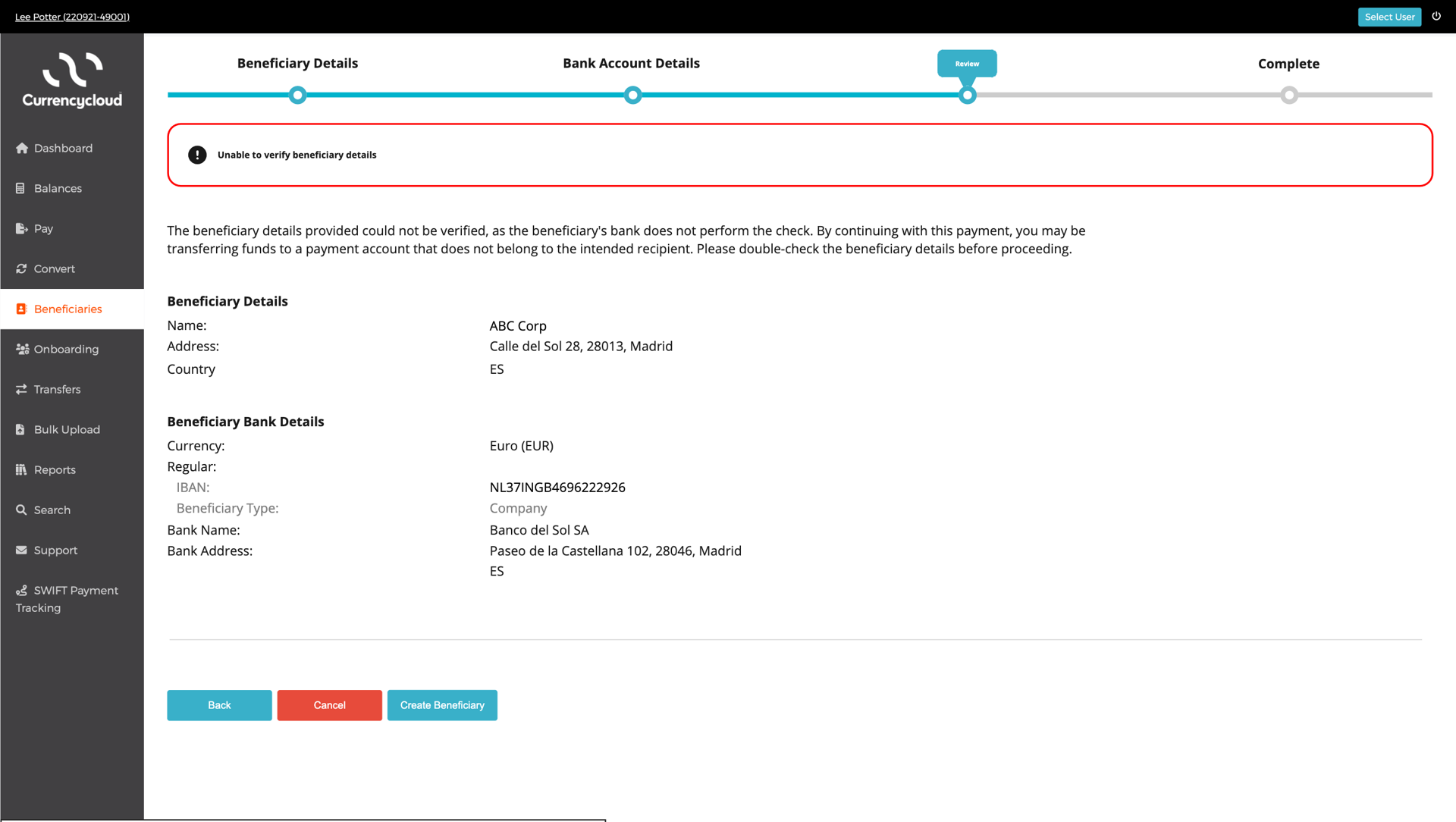
  "reason": "The beneficiary details provided could not be verified, as the beneficiary's bank does not perform the check. By continuing with this payment, you may be transferring funds to a payment account that does not belong to the intended recipient. Please double-check the beneficiary details before proceeding.",
  "reason_type": "rejected"
}
API Response: AV208
Response: The beneficiary details provided could not be verified, as the beneficiary's bank does not perform the check. By continuing with this payment, you may be transferring funds to a payment account that does not belong to the intended recipient. Please double-check the beneficiary details before proceeding.
Handling: It’s not a match. Display a negative notice highlighting the error. The actual_name will not be provided in the response. Create a button to give the end-customer the choice to edit the account details or keep what they entered.
In the event of a no match, it’s important that you explain the problem clearly. However, if the end-customer decides to proceed, present a dialogue box with a secondary warning indicating that they do so at their own discretion and risk.
UI Suggestion:
Full list of reason codes:
The style and tone of the Currencycloud Direct platform serve as the basis for our copy and handling suggestions. Although it's not necessary to match this exactly, your integration should closely mirror it to maintain a consistent user experience.
Successful Responses (HTTP 200)
| Answer | Reason Code | Reason | Reason Type | Suggested Copy | How to handle |
| full_match | AV100 | Beneficiary details confirmed. | Okay |  Beneficiary details confirmed Beneficiary details confirmedThe beneficiary details provided match those on record.. [Back] [Cancel] [Create Beneficiary] | Display a positive notice to end-customer, indicating successful verification. |
| no_match | AV201 | Beneficiary details provided do not match those on record. By authorising this payment, you may be transferring funds to a payment account that does not belong to the intended recipient. Please double-check the beneficiary details before proceeding. | Rejected |  Unable to match beneficiary details Unable to match beneficiary detailsThe beneficiary details provided do not match those on record. By continuing with this payment, you may be transferring funds to a payment account that does not belong to the intended recipient. Please double-check the beneficiary details before proceeding. [Back] [Cancel] [Create beneficiary] Are you sure you want to continue? Paying this person or business may lead to your money being sent to the wrong account. We may not be able to recover the money for you. [Cancel] [Continue Anyway] | 1. Display a negative notice highlighting the error. 2. Create a button to give the end-customer the choice to go Back, Cancel or Create Beneficiary. 3. If the user clicks/taps 'Back' a new API request must be submitted to check the new details. 4. If the user clicks/taps 'Create Beneficiary', end-customer should receive a secondary warning via a dialogue box. |
| no_match | AV202 | The beneficiary details provided could not be verified at this time. By continuing with this payment, you may be transferring funds to a payment account that does not belong to the intended recipient. Please double-check the beneficiary details before proceeding. | Rejected | Unable to verify beneficiary details The beneficiary details provided could not be verified at this time. By continuing with this payment, you may be transferring funds to a payment account that does not belong to the intended recipient. Please double-check the beneficiary details before proceeding. [Back] [Cancel] [Create Beneficiary] Are you sure you want to continue? Paying this person or business may lead to your money being sent to the wrong account. We may not be able to recover the money for you. [Cancel] [Continue Anyway] | 1. Display a negative notice highlighting the error. 2. Create a button to give the end-customer the choice to go Back, Cancel or Create Beneficiary. 3. If the user clicks/taps 'Back' a new API request must be submitted to check the new details. 4. If the user clicks/taps 'Create Beneficiary', end-customer should receive a secondary warning via a dialogue box. |
| no_match | AV208 | The beneficiary details provided could not be verified, as the beneficiary's bank does not perform the check. By continuing with this payment, you may be transferring funds to a payment account that does not belong to the intended recipient. Please double-check the beneficiary details before proceeding. | Rejected | Unable to verify beneficiary details The beneficiary details provided could not be verified, as the beneficiary's bank does not perform the check. By continuing with this payment, you may be transferring funds to a payment account that does not belong to the intended recipient. Please double-check the beneficiary details before proceeding. [Back] [Cancel] [Create Beneficiary] Are you sure you want to continue? Paying this person or business may lead to your money being sent to the wrong account. We may not be able to recover the money for you. [Cancel] [Continue Anyway] | 1. Display a negative notice highlighting the error. 2. Create a button to give the end-customer the choice to go Back, Cancel or Create Beneficiary. 3. If the user clicks/taps 'Back' a new API request must be submitted to check the new details. 4. If the user clicks/taps 'Create Beneficiary', end-customer should receive a secondary warning via a dialogue box. |
| close_match | AV300 | The beneficiary details provided closely match those on record, however the beneficiary name is `[actual_name]`. By authorising this payment, you may be transferring funds to a payment account that does not belong to the intended recipient. Please double-check the beneficiary details before proceeding. | Warning |  Incorrect beneficiary name Incorrect beneficiary nameThe beneficiary details provided closely match those on record, however the beneficiary name is `[actual_name]`. By authorising this payment, you may be transferring funds to a payment account that does not belong to the intended recipient. Please double-check the beneficiary details before proceeding. [Back] [Cancel] [Create Beneficiary] _(disabled until selection is made)_ Are you sure you want to continue? Paying this person or business may lead to your money being sent to the wrong account. We may not be able to recover the money for you. [Cancel] [Continue Anyway] | 1. Display a negative notice highlighting the error. 2. The `actual_name` will be provided. Wrap the provided copy around the [`actual_name`]. 3. Create a button to give the end-customer the choice to go Back, Cancel or Create Beneficiary. 4. If the user clicks/taps Back a new API request must be submitted to check the new details. 5. If the user clicks/taps “Create Beneficiary”, end-customer should receive secondary warning via a dialogue box. |
Full list of technical Errors
HTTP 503 - Service Unavailable
| Error Code | Error Error reason | Required Copy | How to handle |
| service_unavailable | Service is temporarily unavailable | Unable to verify beneficiary details It has not been possible to check the beneficiary details you have provided at this time. Please try creating the beneficiary again later, or click 'Create Beneficiary' if you are sure the details are correct. [Back] [Cancel] [Create Beneficiary] Are you sure you want to continue? Paying this person or business may lead to your money being sent to the wrong account. We may not be able to recover the money for you. [Cancel] [Continue Anyway] | Connection has failed 1. Display a negative notice highlighting the issue. 2. Introduce an internal retry mechanism, before presenting the error back to the user. 3. If the user clicks/taps 'Back to details', the end-customer goes back to the beneficiary creation screen. 4. A new request is required to check the new details. 5. If the user clicks/taps 'Continue Anyway', the end-customer should receive a secondary warning. |
HTTP 400 - Bad Request
Required copy and handling requirements are not applicable for HTTP 400 errors as the end-customer should not be able to trigger these validations.
| invalid_bank_country | bank country is not supported |
| invalid_field_bank_country | bank_country must match \"^[A-Z]{2}\$\ |
| invalid_field_iban | iban must match `^[a-zA-Z]{2}[0-9]{2}[a-zA-Z0-9]{1,30}$`` |
| invalid_field_beneficiary_type | beneficiary_entity_type must be either 'individual' or 'company'. |
| expect_individual_names_only | beneficiary_company_name must not be supplied when beneficiary_entity_type is individual. |
| expect_company_name_only | beneficiary_first_name and beneficiary_last_name must not be supplied when beneficiary_entity_type is company. |
| missing_individual_names | beneficiary_first_name and beneficiary_last_name are required when beneficiary_entity_type is individual. |
| missing_company_name | beneficiary_company_name is required when beneficiary_entity_type is company. |
Step 3: Create Beneficiary
After verifying the details, you can then set up a beneficiary record by making a POST request to the 'Create Beneficiary' endpoint at /v2/beneficiaries/create and proceed with sending your payments.
If there's a 'close match' during Account Verification and the user picks the account name from the response, you need to use those details when setting up the beneficiary.
Content-Type: multipart/form-data
| name | Form Data | Ricardo Sousa |
| bank_account_holder_name | Form Data | Ricardo Sousa |
| currency | Form Data | EUR |
| beneficiary_country | Form Data | FR |
| bank_country | Form Data | FR |
| iban | Form Data | [Sensitive data redacted] |
If the beneficiary is successfully created, the response message will contain full details about the beneficiary as recorded in your Currencycloud account.
Note the beneficiary's unique ID (`id`). You'll need this to make a payment to the beneficiary.
HTTP/1.1 200 OK Content-Type: application/json

{
  "id": "aea097c2-39e4-49b5-aaa6-c860ca55ca0b",
  "bank_account_holder_name": "Acme GmbH",
  "name": "Acme GmbH", "email": null,
  "payment_types": [ "regular" ],
  "beneficiary_address": [],
  "beneficiary_country": "DE",
  "beneficiary_entity_type": null,
  "beneficiary_company_name": null,
  "beneficiary_first_name": null,
  "beneficiary_last_name": null,
  "beneficiary_city": null,
  "beneficiary_postcode": null,
  "beneficiary_state_or_province": null,
  "beneficiary_date_of_birth": null,
  "beneficiary_identification_type": null,
  "beneficiary_identification_value": null,
  "bank_country": "DE",
  "bank_name": "Test Bank Plc",
  "bank_account_type": null,
  "currency": "EUR",
  "iban": "[Sensitive data redacted]",
  "default_beneficiary": "false",
  "creator_contact_id": "1993263d-be07-42d4-b75b-ae4ea18bcb6c",
  "bank_address": [],
  "created_at": "2021-02-02T11:52:23+00:00",
  "updated_at": "2021-02-02T11:52:23+00:00",
  "beneficiary_external_reference": null
}
Step 4: Develop your User Journey
The following best practices are recommended when integrating Verify Beneficiary Account API into your application:
1 Clear Messaging: Ensure that the message accompanying each response is succinct, informative, and user-friendly.
2 Visual Feedback: Use visual elements such as icons, colours, and message banners to provide clear feedback to users.
3 Error Handling: Implement robust error handling to gracefully deal with unexpected responses or errors from the Verify Beneficiary Account API.
4 Accessibility: Design the UI to be accessible to all users, ensuring that response messages are perceivable and understandable.
By following these guidelines you can seamlessly integrate the Verify Beneficiary Account API responses with your interface, providing users with a smooth and intuitive experience when verifying beneficiary details.
Here are examples
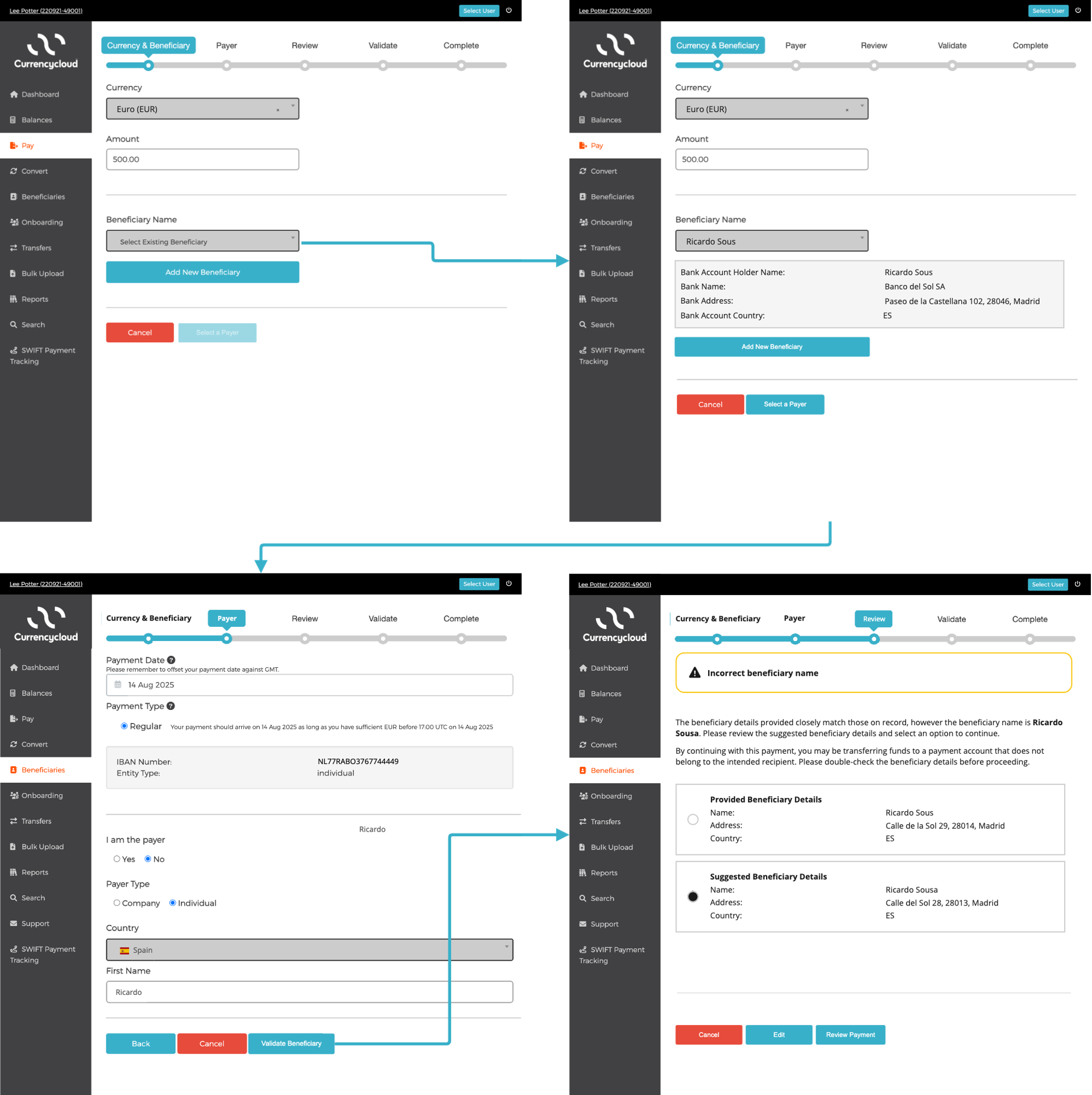
Example 1 - Paying a new beneficiary
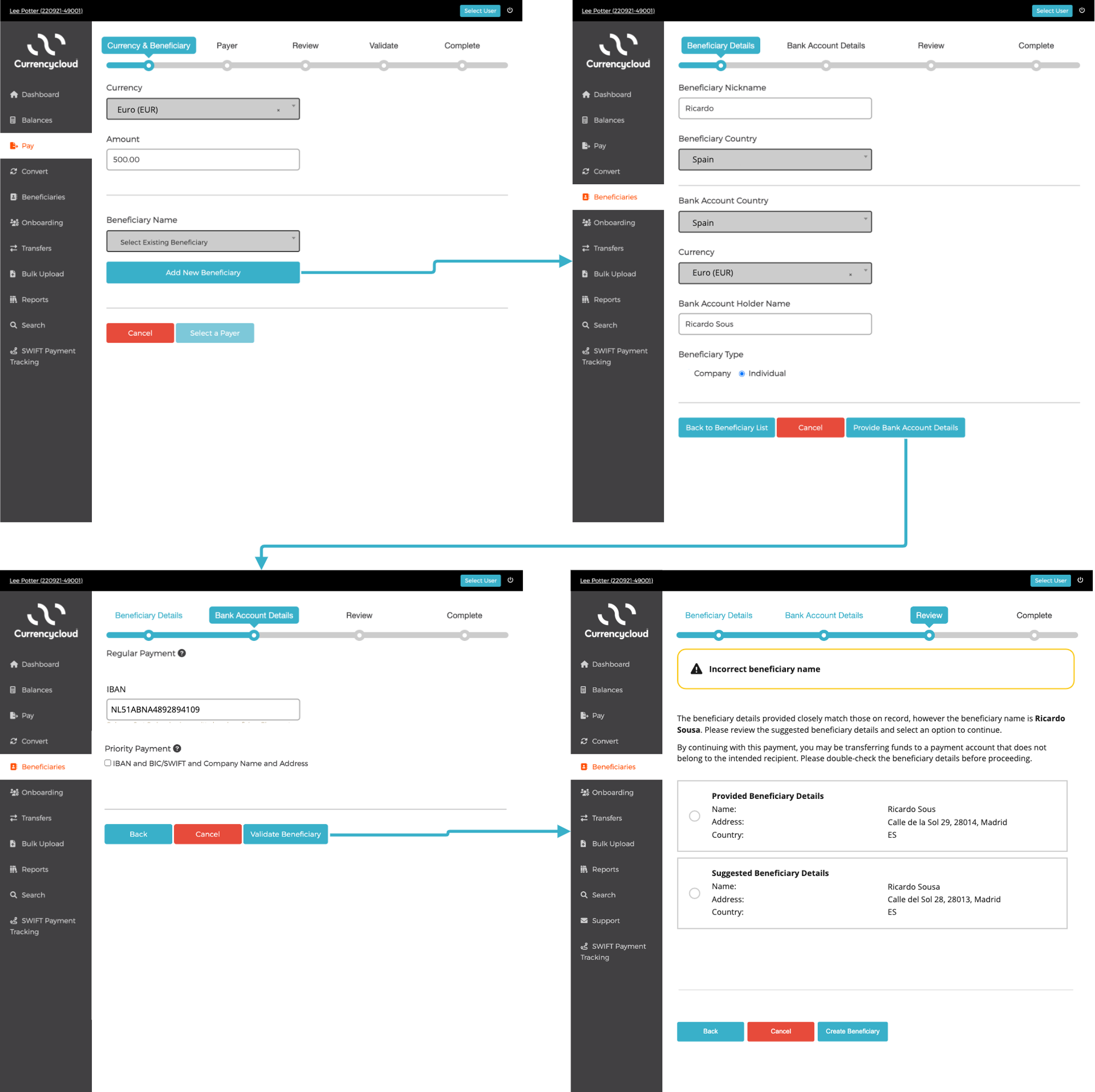
Example 2 - Paying an existing beneficiary