Multiple Sub-Accounts
Our multiple sub-account feature enables you to provide your customers with more than one account, each with its own unique account details. This is particularly useful for merchant clients who want to list their products on multiple marketplaces and require a separate account for each marketplace or sales channel.
Key Points
-
The number of sub-accounts a client can have varies, your account manager will confirm the number for your configuration. Account creation attempts beyond the allocated limit will be denied.
-
Each sub-account has its own account details.
-
Each sub-account requires its own contact, created via the standard Create Contact API flow. Linking a contact to a sub-account enables you to perform conversions, payments, and reporting at the sub-account level. You can use the same contact details (first name, last name, email address etc) for each sub-account.
Workflow Diagram
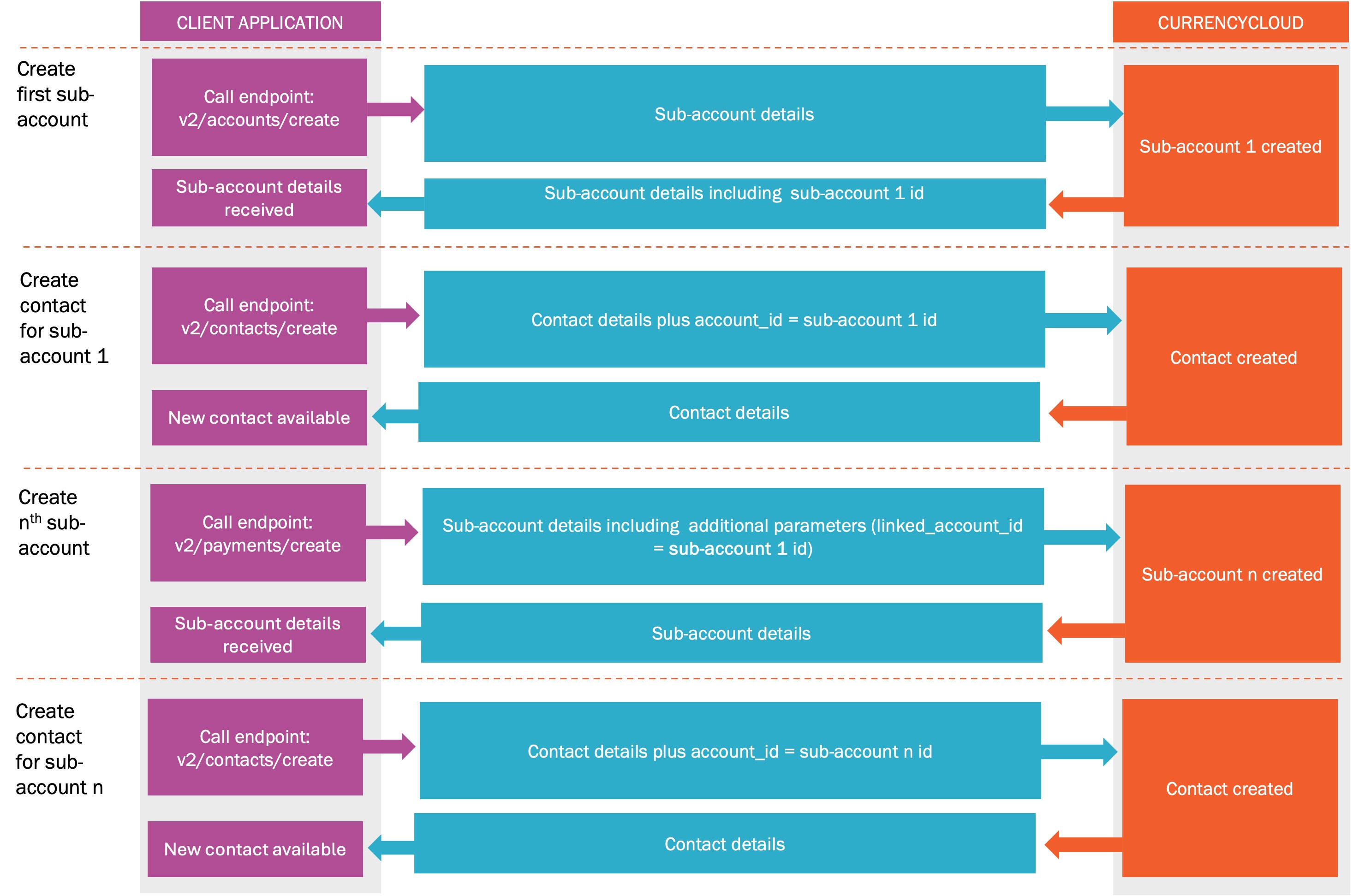
Step 1: Create the first sub-account
After you complete your own KYC processes on your customer, you can create the initial sub-account in the Currencycloud ecosystem using the Create Account endpoint. An example of a successful request and response looks like this:
account_name | Form Data | Jimmy's Burritos |
legal_entity_type | Form Data | company |
street | Form Data | 123 Main Street |
city | Form Data | Denver |
country | Form Data | US |
postal_code | Form Data | 80209 |
your_reference | Form Data | 12345678 |
status | Form Data | enabled |
state_or_province | Form Data | CO |
identification_type | Form Data | incorporation_number |
identification_value | Form Data | 123456789 |
X-Auth-Token | header | ea6d13c7bc50feb46cf978d137bc01a2 |
Response:
{
    "id": "53d15949-b1e9-4335-a4e4-56ae8adef95e",
    "account_name": "Jimmy's Burritos",
    "brand": "currencycloud",
    "your_reference": "123456789",
    "status": "enabled",
    "street": "123 Main Street",
    "city": "Denver",
    "state_or_province": "CO",
    "country": "US",
    "postal_code": "80209",
    "spread_table": "flat_0.00",
    "legal_entity_type": "company",
    "created_at": "2025-03-25T15:22:47.276+00:00",
    "updated_at": "2025-03-25T15:22:47.275+00:00",
    "identification_type": "incorporation_number",
    "identification_value": "123456789",
    "short_reference": "210325-03783",
    "api_trading": true,
    "online_trading": true,
    "phone_trading": true,
    "process_third_party_funds": false,
    "settlement_type": "net",
    "agent_or_reliance": false,
    "terms_and_conditions_accepted": null
}
From the response payload, you will need to parse and retain the account UUID (id) parameter from the above example. This value will be used in the next API call to create a subsequent sub-account for this specific end-client.
Step 2: Create another sub-account for the same customer
To successfully create a subsequent sub-account for the same customer, you will need to send additional details in the Create Account request. You can use the existing ‘your_reference’ field to distinguish between the accounts.
In addition to the fields documented in Step 1, the fields in the table below are mandatory for multiple sub-account creation.
| identification_type | Form Data | incorporation_number | Must be set to "incorporation_number" |
| identification_value | Form Data | 123456789 | Must be the actual incorporation number. |
| industry_type* | Form Data | 'shoe store' | There is a character limit of 255. |
| business_website_URL* | Form Data | http:// www.mycompany.com | There is a character limit of 400 for this field. |
| linked_account_id | Form Data | 66f51c98-1ef8-4e48-97de-aac0353ba2b4 | This is an undocumented field but is essential to open multiple accounts for a customer. It must always be the account UUID of the FIRST sub-account created for the customer. |
You will be able to update some of this data using our Update Account endpoint.
You will be able to update the following new fields:
- Business Website URL
- Industry Type
You will not be able to update or delete Linked Account ID via the API. Please get in touch with us to do this.
None of the newly created fields are available from the GET endpoint at this point.
An example of a successful request and response is below. Please note, the new fields, linked_account_id, business_website_URL and industry_type won’t show in the response.
account_name | Form Data | Jimmy's Burritos |
legal_entity_type | Form Data | company |
street | Form Data | 123 Main Street |
city | Form Data | Denver |
country | Form Data | US |
postal_code | Form Data | 80209 |
your_reference | Form Data | 12345678 |
status | Form Data | enabled |
state_or_province | Form Data | CO |
identification_type | Form Data | incorporation_number |
identification_value | Form Data | 123456789 |
X-Auth-Token | header | ea6d13c7bc50feb46cf978d137bc01a2 |
Response:
{
    "id": "53d15949-b1e9-4335-a4e4-56ae8adef95e",
    "account_name": "Jimmy's Burritos",
    "brand": "currencycloud",
    "your_reference": "123456789",
    "status": "enabled",
    "street": "123 Main Street",
    "city": "Denver",
    "state_or_province": "CO",
    "country": "US",
    "postal_code": "80209",
    "spread_table": "flat_0.00",
    "legal_entity_type": "company",
    "created_at": "2025-03-25T15:22:47.276+00:00",
    "updated_at": "2025-03-25T15:22:47.275+00:00",
    "identification_type": "incorporation_number",
    "identification_value": "123456789",
    "short_reference": "210325-03783",
    "api_trading": true,
    "online_trading": true,
    "phone_trading": true,
    "process_third_party_funds": false,
    "settlement_type": "net",
    "agent_or_reliance": false,
    "terms_and_conditions_accepted": null
}
A successful response confirms the new sub-account has been created.
Repeat Step 2 for every additional sub-account required.